
Introduction
Finding a laptop under ₹20,000 in 2026 is still possible, but expectations need to be realistic. These entry-level devices are best suited for basic tasks like online classes, web browsing, video streaming, and light document work.
With improvements in ChromeOS and lightweight Windows laptops, even budget devices now feel smoother and more responsive for everyday use. If you need a simple, portable, and affordable device, this segment still offers some decent options.
What to Expect in a Laptop Under ₹20,000
- Basic Processors:
Intel Celeron (N4020/N4500), Intel N-series (N50/N100 in rare deals), or ARM-based chips for lightweight usage. - RAM and Storage:
Typically 4GB RAM with 64GB or 128GB eMMC/SSD storage—enough for basic tasks but limited for heavy use. - Lightweight Operating Systems:
ChromeOS dominates this segment due to better performance on low-end hardware, while Windows options exist with limited capabilities. - Portability:
Compact 11.6 to 14-inch laptops with lightweight builds (1–1.4 kg). - Battery Life:
6–10 hours, depending on usage, especially strong on Chromebooks.
Best Selling Laptops Under ₹20,000 in India

- MediaTek Helio G99 Processor: Experience lag-free multitasking with the octa-core 2.2 GHz G99 chipset (MT8781), designed for smooth app performance, fast boot times, and all-day responsiveness to keep you going.
- Ample Storage & Memory: Multitask seamlessly with LPDDR4 6GB RAM optimised for performance apps. With 128GB internal storage plus microSD expansion up to 512GB, you’ll never run out of space.
- Compact & Immersive Display: The 11.6-inch HD IPS screen delivers vibrant colours and wide viewing angles, ideal for watching, reading, or attending classes, even on the go.
- Versatile Connectivity Options: Primebook 2 Neo comes equipped with USB Type-C for charging, 2 USB-A ports, and a 3.5mm audio jack. Additionally, a dedicated microSD slot allows you to expand storage for added flexibility.
- CONNECTIVITY: Dual-band Wi-Fi (2.4GHz & 5GHz), Bluetooth 5.1, multiple USB ports including Type-C, and 3.5mm audio output
- Lightweight and Travel-Ready Design: Weighing just 1.1 kg, Primebook 2 Neo is slim, sturdy, and easy to carry. It’s well-suited for those who learn, create, and work on the move
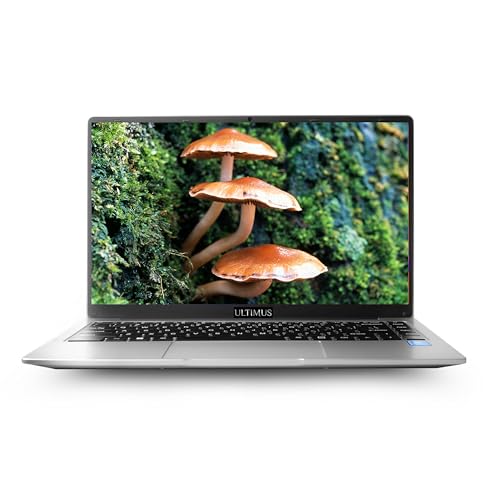
- Balanced Performance for Everyday Tasks – Powered by an Intel Pentium N4200 Quad Core processor with speeds up to 2.8 GHz, 4 cores, 4 threads & a 2 MB smart cache ensuring smooth browsing, office work and streaming.
- Vibrant HD IPS Display – Enjoy clear visuals on a 35.5 cm anti-glare screen with a 1366×768 resolution, 16:9 aspect ratio and IPS technology for better viewing angles perfect for work, movies and video calls.ultra thin bazel 180° Hinge
- More Space, More Freedom – Comes with 4GB RAM and a fast 128GB EMMC Onbord for quick boot times and file access. expand the storage upto 1TB SSD M.2. Or easily expand your storage with a convenient memory card slot.
- Enhanced Graphics & Clear Video Calls – Features Intel UHD Graphics 505 for crisp visuals and a HD camera with dual microphone, delivering smooth, clear video conferencing and online learning.
- Ultra-Light & Travel-Ready – Built for portability with a slim 1.95 cm thin design, weighing only 1.2 kg. Powered by a durable Li-ion battery offering up to 8 hours of battery life perfect for students and digital nomads.

- Always-on internet with 4G LTE and Dual band Wi-Fi (2.4GHz and 5.0 GHz)
- Processor: Mediatek MT 8788 Octa Core/ARM V8-A 64 bit / 4GB LPDDR4 RAM/ 64 GB Storage/ Expandable up to 256GB via SD card.
- 990gms light & ultra-compact makes it easy to carry anywhere
- Anti-glare HD Display & Stereo Speakers helps you to work outdoors
- Infinity Keyboard & large touchpad ensures convenient, seamless & efficient workflow.
- Battery Average Life: 8.0 Hours
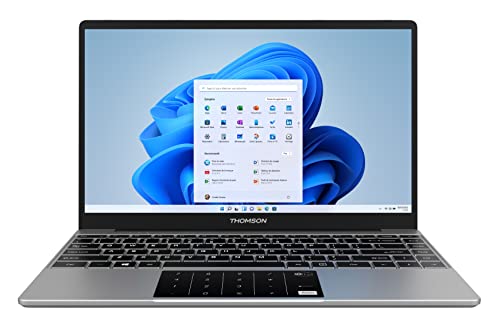
- Enjoy the Powerful Performance with Thomson Laptop which ensures best value for money with best features. You can work or browse without hassles on the go with this light weight laptop. It can easily extend the storage by adding an M2-SSD up to 512GB via a hatch under the laptop
- Light & Affordable
- Upgradable storage
- Long Lasting Battery
- Portable personal computer
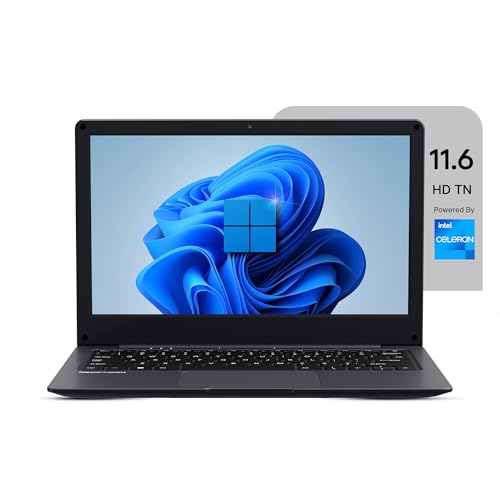
- Celeron N4020 Processor: Powered by the Celeron N4020 dual-core processor (up to 2.8GHz) and UHD Graphics 600, this laptop ensures smooth multitasking and reliable performance for study, office, or entertainment use.
- Fast Memory & Expandable Storage: Equipped with 4GB LPDDR4 RAM and 128GB eMMC storage, along with an M.2 SSD slot (SATA protocol) that supports expansion up to 1TB, allowing you to store more files, applications, and media with ease.
- 11.6″ HD Display & Clear Audio: Features an 11.6-inch HD (1366×768) display that delivers crisp visuals and vivid colors, paired with dual 8Ω/1W speakers and a 2.0MP front camera for clear video calls and online learning.
- Versatile Connectivity Ports: Offers multiple connectivity options, including USB 3.0, USB Type-C, HDMI, Micro SD slot, and a 3.5mm headphone jack, along with WiFi 802.11 ac/b/g/n and Bluetooth 4.2 for seamless wireless connections.
- 31Wh Long-Lasting Battery: Powered by a 31Wh / 4000mAh battery, providing up to 5 – 6 hours of backup so you can stay productive, entertained, and connected wherever you go.
Who Are These Laptops For?
- Students:
Perfect for online classes, browsing, and simple assignments. - Casual Users:
Ideal for watching videos, web browsing, and light productivity. - Backup Devices:
Useful as a secondary laptop for travel or emergency use.
How to Choose the Right Laptop Under ₹20,000
- Operating System:
- Choose ChromeOS for speed and smooth performance.
- Choose Windows only if you need specific software compatibility.
- Processor:
Intel Celeron or MediaTek processors are sufficient for basic tasks. - Display Size:
11.6-inch for portability, 14-inch for better viewing comfort. - Storage:
Prefer 64GB+, and ensure cloud storage or expandable options. - Battery Life:
Look for at least 6–8 hours of backup.
Conclusion
Laptops under ₹20,000 in 2026 are best suited for basic needs, but they still offer good value for students and casual users. Chromebooks, in particular, stand out for their speed, simplicity, and battery life in this budget.
If your usage is limited to browsing, online classes, and light work, these laptops can serve you well without stretching your budget.
Key Takeaways (Very Important in This Budget)
- Helio G99 (Primebook) >> Pentium >> Celeron N4020
- More RAM = smoother experience (6GB > 4GB)
- SSD > eMMC (faster performance)
- Android/Chrome-based OS runs smoother than Windows here
Simple Buying Guide
- Best Overall Performance: Primebook 2 Neo
- Best Windows Laptop: Ultimus Pentium
- Best for Online Classes: JioBook 11
- Avoid if possible: Basic Celeron models (only for minimal use)
Choose wisely based on your needs, and enjoy a simple, hassle-free computing experience.
Disclosure: As an Amazon Associate, Virtual Studio earns from qualifying purchases. This comes at no additional cost to you and helps support our work.