Introduction
Chromebooks have become more powerful and practical in 2026, thanks to improved processors, better app support, and deeper integration with Android and cloud services.
Powered by ChromeOS from Google, these laptops are designed for speed, simplicity, and security. Whether you’re a student, remote worker, or casual user, Chromebooks offer a smooth and hassle-free experience for everyday computing.
What is a Chromebook?
A Chromebook is a laptop or 2-in-1 device that runs ChromeOS, a lightweight operating system focused on web-based applications and cloud storage.
Unlike traditional Windows or macOS laptops, Chromebooks are optimised for:
- Fast boot times
- Automatic updates
- Seamless integration with Google services
They can also run Android apps via the Google Play Store and support many offline features.
Who Should Buy a Chromebook?
- Students:
- Lightweight and easy to carry
- Ideal for online classes, assignments, and research
- Casual Users:
- Perfect for browsing, streaming, and email
- Simple interface with minimal maintenance.
- Frequent Travelers:
- Compact designs and long battery life
- Reliable for work on the go
- Professionals (Web-Based Work):
- Works smoothly with tools like Google Workspace, Zoom, and Slack
Key Features of Chromebooks
- Lightweight Operating System:
ChromeOS is fast, secure, and optimised for web and Android apps. - Affordable Pricing:
Most Chromebooks are budget-friendly compared to traditional laptops. - Cloud-Based Storage:
- Integration with Google Drive
- Easy syncing across devices
- Offline access for essential apps
- Long Battery Life:
Modern Chromebooks offer 8–12+ hours of battery backup. - Built-in Security:
Automatic updates
Sandboxed apps
Strong protection against malware
Pros and Cons of Chromebooks
Pros:
- Fast and responsive performance
- Lightweight and portable
- Affordable pricing
- Simple and beginner-friendly
- Excellent battery life
Cons:
- Limited support for heavy desktop software
- Some features still depend on internet connectivity
- Lower local storage in budget models
- Not suitable for high-end gaming or video editing
What to Look for in a Chromebook (2026 Update)
- Processor:
- Intel N-series (N100/N200): Best for budget users
- MediaTek Kompanio: Efficient and great battery life
- Intel Core i3/i5: Ideal for multitasking and performance
- RAM:
- 4GB: Basic use
- 8GB: Recommended for smooth multitasking
- Storage:
- 64GB eMMC: Standard.
- 128GB SSD: Better for offline usage
- Screen Size and Quality:
- 11.6-inch: Ultra-portable
- 14-inch: Balanced
- Prefer Full HD (1920×1080) for clarity
- Battery Life:
- Look for 8+ hours for all-day usage
- Build Quality:
- Durable designs for students
- 2-in-1 models for touchscreen and flexibility
Best Selling Chromebooks to Consider (2026)
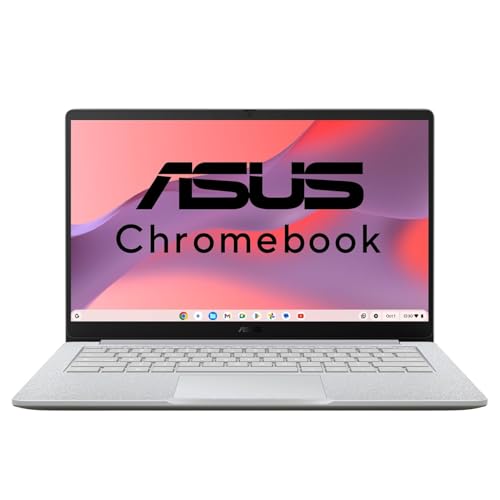
- Processor, Memory & Storage : Intel Processor N50 1.0 GHz (6MB Cache, up to 3.4 GHz, 2 cores, 2 Threads) | Memory : LPDDR5 8GB RAM | Storage : 128G eMMC SSD
- Operating System & Software : ChromeOS
- Display & Graphics : 14.0-inch, FHD (1920 x 1080) 16:9, 300nits Brightness, 60Hz Refresh Rate, Anti-glare display, 86% Screen-to-body ratio | Graphics : Integrated Intel UHD Graphics
- Ports & Connectivity : 1x USB 3.2 Gen 1 Type-A, 2x USB 3.2 Gen 1 Type-C support display / power delivery, 1x HDMI 1.4, 1x 3.5mm Combo Audio Jack | Connectivity : Wi-Fi 6(802.11ax) (Dual band) 2*2 + Bluetooth 5.4 Wireless Card
- Other Features : Camera : 720p HD camera with privacy shutter | Keyboard : Chiclet Keyboard | Battery : 42WHrs, 3S1P, 3-cell Li-ion
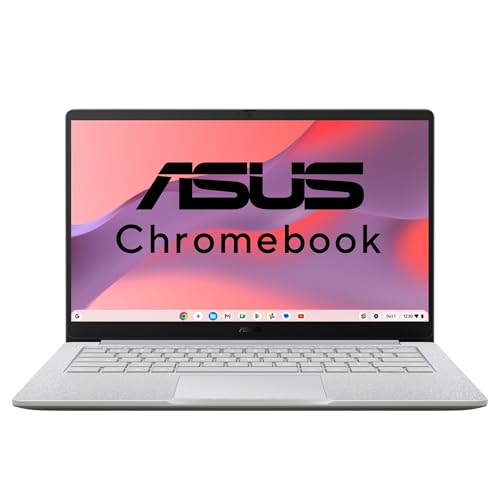
- Processor, Memory & Storage : Intel Core 3-N355 Processor 1.9 GHz (6MB Cache, up to 3.9 GHz, 8 cores, 8 Threads) | Memory : LPDDR5 8GB RAM | Storage : 128G eMMC
- Operating System : ChromeOS
- Display & Graphics : 14.0-inch, FHD (1920 x 1080) 16:9, 300nits Brightness, 60Hz Refresh Rate, Anti-glare display, 86% Screen-to-body ratio | Graphics : Integrated Intel UHD Graphics
- Ports & Connectivity : 1x USB 3.2 Gen 1 Type-A, 2x USB 3.2 Gen 1 Type-C support display / power delivery, 1x HDMI 1.4, 1x 3.5mm Combo Audio Jack | Wi-Fi 6(802.11ax) (Dual band) 2*2 + Bluetooth 5.4 Wireless Card
- Other Features : Camera : 720p HD camera with privacy shutter | Keyboard : Chiclet Keyboard | Battery : 42WHrs, 3S1P, 3-cell Li-ion
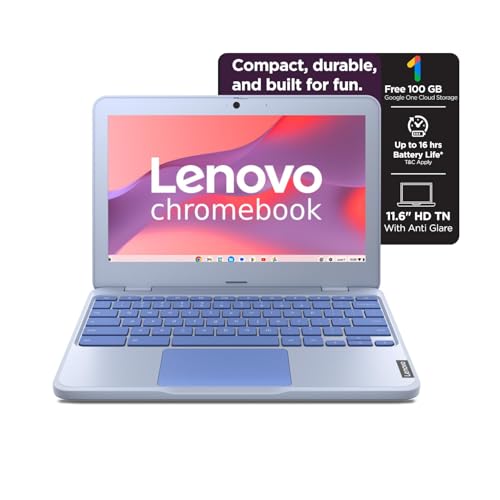
- Processor: Intel Celeron N4500 | Speed: 1.1GHz (Base) – 2.8GHz (Max) | 2 Cores | 2 Threads | 4MB Cache
- Display: 11.6″ HD (1366×768) | 250Nits Brightness | Anti Glare
- OS:- Chrome OS| Pre Installed Software: None
- Memory and Storage: 4GB Soldered LPDDR4x-2933, 4GB soldered memory, not upgradable | 64GB eMMC 5.1, 64GB eMMC 5.1 on systemboard, eMMC on systemboard, no slots
- Camera:- Front HD 720p with Privacy Shutter || Speakers:- Stereo speakers, 2W x2
- Battery:- 42Wh |supports Rapid Charge (charge up to 80% in 1hr) | Max Battery Life : Max Battery Life :- Google power load test: 11.9 hr
Why Choose a Chromebook Over a Traditional Laptop?
- Cost-Effectiveness:
Chromebooks offer strong everyday performance at a lower price. - Simplicity:
Easy-to-use interface with minimal setup and maintenance. - Security:
Automatic updates and built-in protection reduce security risks. - Portability:
Lightweight and compact-perfect for students and travellers.
Limitations of Chromebooks
Chromebooks are excellent for web-based use, but have limitations:
- Gaming: Limited to Android or cloud gaming
- Professional Software: Cannot run apps like Adobe Premiere Pro or AutoCAD
- Offline Work: Some restrictions without internet access
Who Should Avoid Chromebooks?
- Gamers needing high-performance hardware
- Professionals using Windows/macOS-specific software
- Users requiring heavy offline workloads
Conclusion
Chromebooks in 2026 are faster, more capable, and more versatile than ever. They are an excellent choice for students, casual users, and professionals who rely on web-based tools.
With their affordability, long battery life, and simplicity, Chromebooks deliver outstanding value for everyday computing. However, for heavy workloads or specialised software, traditional laptops remain the better option.
Key Takeaways
- Core 3-N355 >> N50 >> Celeron N4500 (huge real-world gap)
- 8GB RAM is the minimum for smooth Chromebook use in 2026
- ChromeOS runs fine on low-end chips – but the performance difference is very noticeable
Simple Buying Decision
- Best Performance: ASUS Chromebook CX1405 (Core 3-N355)
- Best Value: ASUS Chromebook CX1405 (N50)
- Basic Use Only:Lenovo Chromebook (N4500)
Choose a Chromebook if your work is mostly online, and enjoy a smooth, secure, and efficient computing experience.
Disclosure: As an Amazon Associate, Virtual Studio earns from qualifying purchases. This comes at no additional cost to you and helps support our work.