Introduction
In today’s fast-paced digital world, UltraWide monitors have revolutionized how we work, play, and create. Offering expansive screen real estate and a more immersive experience than traditional monitors, UltraWide displays are rapidly becoming the go-to choice for professionals, gamers, content creators, and multitaskers alike.
What is an UltraWide Monitor?
An UltraWide monitor typically features a 21:9 aspect ratio (or even wider, like 32:9), compared to the standard 16:9. This means you get a significantly wider display, ideal for viewing multiple windows side by side, enhancing cinematic content, or expanding your field of view in games
Key Benefits of UltraWide Monitors
1. Productivity Boost
- UltraWide monitors allow you to work with multiple applications open simultaneously, without the need for dual monitors.
- Ideal for professionals working in video editing, music production, coding, finance, and data analysis.
2. Immersive Gaming Experience
- Wider field of view enhances peripheral vision, giving gamers a competitive edge.
- Many models come with high refresh rates (144Hz+) and adaptive sync technologies for smoother gameplay.
3. Superior Multitasking
- Seamlessly manage multiple tasks such as browsing, video calls, spreadsheets, and design tools—all on one screen.
- Perfect for remote work setups and digital creatives.
4. Enhanced Entertainment
- Enjoy cinema-like movie watching with the 21:9 aspect ratio, which is closer to the format used in most films.
- Great for streaming, content creation, and immersive media consumption.
Top Features to Look for in an UltraWide Monitor
- Screen Size & Resolution: Larger displays (34″ and above) with QHD (3440×1440) or UHD resolutions provide crisp visuals.
- Panel Type: IPS panels offer better color accuracy and viewing angles; VA panels have deeper contrast.
- Curvature: Curved UltraWide monitors (1000R–1800R) enhance immersion, especially for gaming and media.
- Refresh Rate & Response Time: For gamers, a higher refresh rate (144Hz+) and low response time are crucial.
- Connectivity: Look for USB-C, HDMI 2.1, DisplayPort, and built-in KVM switch for multitasking.
- Adjustability: Height, tilt, swivel, and VESA mount compatibility improve ergonomics.
Recommended UltraWide Monitors
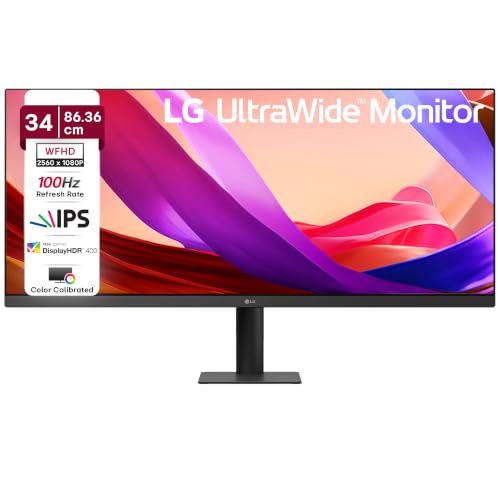
- Display: UltraWide 34 in (86.36 cm), IPS panel (2560 x 1080), 21:9 aspect ratio, with brightness levels of 400cd/m², a contrast ratio 1000:1 , wide 178º(R/L), 178º(U/D) viewing angles, making it suitable for both work and entertainment.
- 100Hz Refresh Rate & 5ms Response: With a 100Hz refresh rate and a 5ms response time, the monitor delivers smooth, fluid visuals, Fast-paced content such as gaming or video playback remains responsive and free from distracting motion blur.
- HDR10 & HDR Effect: HDR10 support for enhanced contrast and brightness, HDR Effect mode for vivid, lifelike visuals, The anti-glare surface ensures comfortable viewing in different lighting conditions.
- Professional Color Accuracy: sRGB 99% (CIE1931) Color Gamut, 8bit (6bit+FRC) Color, 16.7M Color Depth, Multiple Picture Mode SDR:Custom / VIVID / HDR Effec /Reader mode/ Cinema/ FPS/ RTS/ Color Weakness.
- Eye-Care Features: To reduce eye strain during long sessions, the monitor integrates Flicker Safe, Reader Mode, Color Weakness, Super Resolution+, these features make extended use more comfortable and healthier for the eyes.
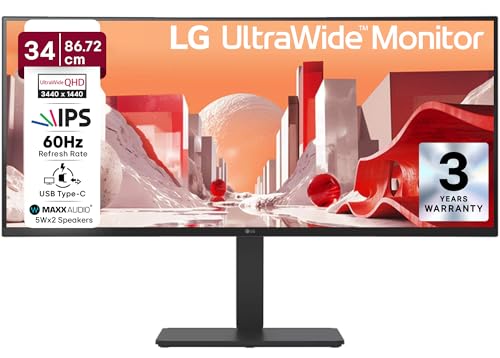
- Display: 34-inch Curved IPS UltraWide WQHD (3440 × 1440), 21:9 aspect ratio, Anti-glare Surface, Brightness 300 nits (typical), 1000:1 Contrast Ratio (Typ.), Viewing angles 178º(R/L), 178º(U/D), sRGB 99% coverage, 10-bit (8bit+FRC) color depth, 1.07B colors, Curvature: 3800R
- 60Hz Refresh Rate & 5ms Response Time: This model supports 60Hz refresh rate with 5ms response time (GtG), optimized for productivity and multimedia rather than high-speed gaming
- Design & Ergonomics: Curved design, Tilt/Height/Swivel adjustable stand, VESA mount compatibility (100 × 100), slim profile (83.6 mm thickness), weight ~7.5kg
- HDR10 & HDR Effect: HDR10 support for enhanced brightness and contrast, HDR Effect improves SDR conten
- Versatile Connectivity: 2×HDMI (2.2 HDCP Version), 1×DisplayPort (DP Version 1.4), 1×USB-C (DP 1.4, 3440 × 1440 @60Hz, 90W Power Delivery, Data Transmission), RJ45 (LAN port), Built-in speakers for audio output.

- 34 (86.36cm) 21:9 WQHD Curved (3440×1440) display
- sRGB 99% (Typ.), HDR10, 100Hz refresh rate
- One Click Stand / Tilt Adjustable Stand
- 34WR50QK allows you to see multiple contents from two computers with the picture-by-picture feature, so it helps to process work efficiently.
- Reader Mode / Flicker Safe
Final Thoughts
Whether you’re a creative professional, gamer, or remote worker, an UltraWide monitor can redefine your digital experience. It combines productivity, performance, and entertainment into one sleek package. With the right features and specifications, it can significantly improve your efficiency and enjoyment.
Ready to upgrade your setup? Explore the latest UltraWide monitors and experience the difference today!
Disclosure: As an Amazon Associate, Virtual Studio earns from qualifying purchases. This comes at no additional cost to you and helps support our work.