
Table of Contents
Affiliate Disclosure: As an Amazon Associate, vsworld.com may earn from qualifying purchases at no extra cost to you.
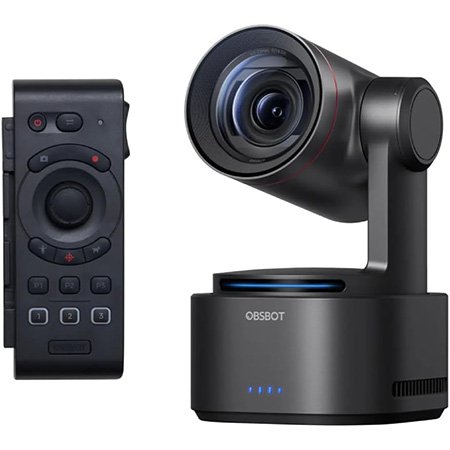
There are cameras that record video, and then there are cameras that quietly remove friction from your entire production workflow. The OBSBOT Tail 2 belongs in the second group.
On paper, it already looks strong: 4K at 60fps, AI Tracking 2.0, 5x optical zoom, 12x hybrid zoom, a 1/1.5-inch sensor, vertical shooting, NDI, SDI, HDMI, UVC, Ethernet, and FreeD support. That is a lot of power packed into one compact camera. But specs alone do not sell a smart purchase. What matters is whether those features actually help real teams create better video with less hassle.
That is where the OBSBOT Tail 2 becomes interesting.
For solo creators, it can act like a camera operator that never asks for a break. For churches, it can keep a speaker framed without constant manual control. For webinar teams, it can make sessions look more dynamic without adding complexity. For hybrid event producers, it can slot into more professional workflows than most “creator cameras” even attempt.
And that matters to the vsworld.com audience. At Virtual Studio, the bar is never just “can it stream?” The real question is whether a tool can support brand experience, operational reliability, production quality, and scale. When that standard is the benchmark, gear choices stop being casual purchases and start becoming workflow decisions.
So, is the OBSBOT Tail 2 actually worth it? And is it a smart recommendation for live streaming, webinars, hybrid events, corporate content, worship production, and virtual studios?

Why the OBSBOT Tail 2 is getting so much attention
Most PTZ cameras live in one of two worlds.
The first world is the classic broadcast-style PTZ camera: capable, dependable, and often a bit intimidating for non-technical teams. The second world is the content creator camera: easier to use, more app-friendly, but sometimes missing the connectivity and control demanded in professional environments.
The OBSBOT Tail 2 tries to bridge those worlds.
It brings together the convenience that creators want and the signal flow that production teams need. That means it appeals to a surprisingly broad audience:
- YouTubers and solo creators who want motion and tracking without hiring crew
- Churches and ministries that need smoother sermon and worship coverage
- Corporate communications teams producing webinars, town halls, and training
- Event agencies looking for compact cameras with professional outputs
- Education teams running lectures, workshops, and hybrid classrooms
- Virtual production teams experimenting with smarter camera movement and FreeD workflows
In other words, the OBSBOT Tail 2 does not sit neatly in one category. It is part smart creator camera, part live production tool, and part automation upgrade.
That blend is exactly why it has earned so much attention.
OBSBOT Tail 2 at a glance
| Feature | What You Get | Why It Matters |
| Resolution | 4K at 60fps, 1080p at 120fps | Crisp live streams and smooth motion |
| Sensor | 1/1.5-inch CMOS | Better light handling and image depth than many compact cameras |
| Zoom | 5x optical, 12x hybrid | Useful framing flexibility without physically moving the camera |
| Tracking | AI Tracking 2.0 | Hands-free subject tracking for people, objects, and more |
| Design | PTZR with 90° rotation | Native horizontal and vertical shooting in one device |
| Connectivity | SDI, HDMI, USB, Ethernet, audio in, microSD, RS-232 | Fits creator setups and pro production chains |
| Protocols | NDI, SRT, RTSP, FreeD | Easier integration for streaming and virtual production |
| Battery | Built-in battery | Better portability for events and location work |
| Control | App, browser, software suite, remote options | Flexible operation for solo and team workflows |
Here is the quick version for busy readers.
| Feature | What You Get | Why It Matters |
| Resolution | 4K at 60fps, 1080p at 120fps | Crisp live streams and smooth motion |
| Sensor | 1/1.5-inch CMOS | Better light handling and image depth than many compact cameras |
| Zoom | 5x optical, 12x hybrid | Useful framing flexibility without physically moving the camera |
| Tracking | AI Tracking 2.0 | Hands-free subject tracking for people, objects, and more |
| Design | PTZR with 90° rotation | Native horizontal and vertical shooting in one device |
| Connectivity | SDI, HDMI, USB, Ethernet, audio in, microSD, RS-232 | Fits creator setups and pro production chains |
| Protocols | NDI, SRT, RTSP, FreeD | Easier integration for streaming and virtual production |
| Battery | Built-in battery | Better portability for events and location work |
| Control | App, browser, software suite, remote options | Flexible operation for solo and team workflows |
If you only needed one sentence, here it is: the OBSBOT Tail 2 is built for people who want better production value without building an overly complicated camera rig.
What makes the OBSBOT Tail 2 different from a typical PTZ camera
A lot of PTZ cameras are functional. Fewer are enjoyable.
That sounds like fluff until you have actually worked with camera systems in live environments. A camera can be technically excellent and still be a pain in the neck to deploy, frame, manage, and adapt for modern content formats.
The OBSBOT Tail 2 stands out because it was designed around how people actually create content now.
That means:
- You may need vertical video for social cutdowns
- You may need AI tracking because one person is doing five jobs
- You may need NDI or SDI because the production stack is not just a laptop anymore
- You may need battery power because not every shoot happens near tidy wall outlets
- You may need clean switching between creator mode and production mode depending on the client
The PTZR concept is the headline here. Traditional PTZ is pan, tilt, and zoom. The R adds rotate, which is a bigger deal than it sounds. It allows the camera to support true vertical shooting without awkward workarounds.
That is useful for:
- Reels and Shorts production
- Portrait-mode livestreams
- Social-first brand campaigns
- Event highlight capture
- Training content built for mobile consumption
For agencies, in-house media teams, and hybrid event operators, that flexibility can mean fewer compromises and faster repurposing.
Key OBSBOT Tail 2 features that matter in real production
4K60 video and a larger sensor
A camera can have all the AI in the world, but if the image looks flat or noisy, the magic fades pretty quickly.
The OBSBOT Tail 2 uses a 1/1.5-inch CMOS sensor and supports 4K at 60fps plus 1080p at 120fps. In practical terms, that gives you a better starting point for live streams, recorded sessions, interview content, performances, education videos, and branded webinars.
Why does this matter?
Because better image quality does more than make footage prettier. It improves perceived professionalism. Audiences may not say, “Ah yes, wonderful sensor size.” But they absolutely notice when the image feels polished, stable, and premium.
That is especially important in:
- Investor updates where credibility matters
- Executive webinars where every detail affects brand perception
- Worship streaming where low-light consistency helps
- Event coverage where mixed lighting can ruin weaker cameras
- Training videos that need to feel more polished than a webcam call
Is it replacing a cinema camera on a big-budget shoot? No. But for the type of workflows many teams actually run every day, it can be more practical than a DSLR rig that demands extra accessories, constant tweaking, and a more experienced operator.
AI Tracking 2.0 that feels genuinely useful
AI tracking” is one of those phrases that can mean either “wow” or “please make it stop.
The reason the OBSBOT Tail 2 earns attention is that the tracking is not just there for the product page. It is central to the camera’s value.
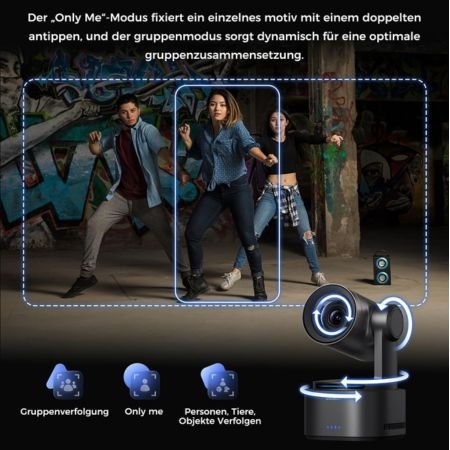
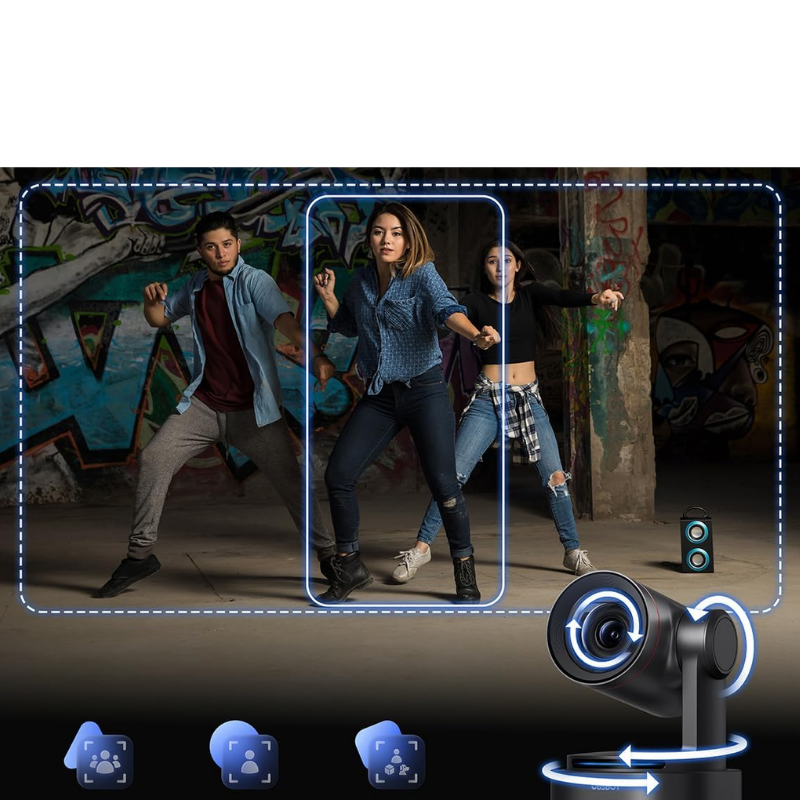
The camera is designed to track subjects more intelligently, support auto zoom, and help maintain framing with less manual intervention. That is useful in the kinds of productions where people move, presenters improvise, or one operator is juggling audio, graphics, switching, and camera control at the same time.
Real-world examples:
- A speaker on stage who does not stay glued to one spot
- A podcast host who shifts position, gestures, or stands up during a segment
- A teacher or trainer moving between a display, whiteboard, and audience area
- A worship leader who needs reliable framing during a live stream
- A solo creator filming talking-head content without a camera operator
This is the sort of feature that saves more than effort. It saves attention. And attention is usually the most limited resource on a live production team
PTZR design for vertical and horizontal production
This is one of the smartest reasons to consider the OBSBOT Tail 2 over more traditional options.
Teams no longer create for one screen.
A single production may need:
- 16:9 live streaming for YouTube or a webinar platform
- 9:16 cuts for Instagram Reels or YouTube Shorts
- square or vertical snippets for internal social posts
- portrait-ready talent clips for paid campaigns
The PTZR design gives the OBSBOT Tail 2 a real edge here. Instead of forcing awkward mounting tricks or heavy cropping, it supports vertical capture more naturally.
That is a meaningful workflow upgrade for brands that care about content reuse. At Virtual Studio, this is a familiar truth: the more efficiently one production can feed multiple channels, the better the ROI becomes.
5x optical zoom and 12x hybrid zoom
Zoom is easy to undervalue until you are stuck with a wide shot that makes everyone look like they are speaking from another postal code.
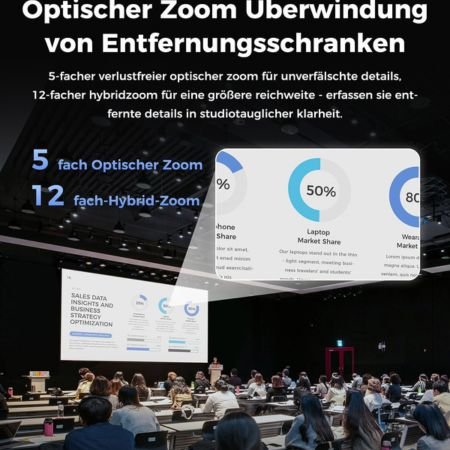
The OBSBOT Tail 2 includes 5x optical zoom and 12x hybrid zoom, which makes it far more useful for stages, sanctuaries, conference rooms, classrooms, and event spaces than many compact streaming cameras.
That helps with:
- tighter speaker framing without moving the tripod
- more dynamic composition in live shows
- cleaner audience-safe camera placement
- better coverage in worship and ceremony environments
- more flexibility when the room layout is less than ideal
Optical zoom is the key phrase there. It gives you real compositional range without leaning too heavily on digital compromises.
Pro connectivity for serious workflows
This is where the OBSBOT Tail 2 stops feeling like “just another smart camera.”
Connectivity includes:
- 3G-SDI
- HDMI 2.0
- USB 3.0 / UVC
- Ethernet with PoE+
- RS-232
- Mic in
- Line in
- microSD recording
- NDI support
- FreeD support
That is a serious set of options.
It means the camera can work in:
- straightforward creator setups
- ATEM-based switching environments
- networked live production systems
- education and corporate AV deployments
- virtual production experiments
- multi-camera event workflows
For the vsworld.com audience, this is the biggest reason the camera is worth discussing. Flashy features are nice. Workflow compatibility is what actually gets gear used.
If your projects span live streaming, hybrid events, webinars, online meetings, or virtual studio environments, the ability to move a camera across setups without rethinking your entire infrastructure is a major advantage.
Related reading on vsworld.com:
Battery life and portability
Many cameras become “portable” only after you redefine the word until it stops meaning anything.
The OBSBOT Tail 2 includes a built-in battery, which makes it genuinely more practical for flexible setups, temporary positions, event locations, and shoots where power access is not convenient.
That does not just help creators. It helps production teams who need options.
Think about:
- a camera angle in a venue where cabling is messy
- a pop-up training setup in an office
- a church balcony placement
- a fast-turn interview corner at an event
- a rehearsal space where mobility matters
Portability is not a vanity feature. It is operational freedom.
Who should buy the OBSBOT Tail 2
Solo creators and streamers
If you are filming yourself, the OBSBOT Tail 2 is an easy product to recommend. It can reduce setup complexity, give your shots motion, and help your content feel more expensive than a static webcam setup.
It is especially compelling for creators who make:
- talking-head videos
- podcasts
- tutorials
- reviews
- performance content
- livestreams
Churches and worship teams
This is one of the strongest use cases.
Church streaming teams often need better camera movement and reliable framing, but not every ministry has the volunteer capacity for multiple skilled operators. The OBSBOT Tail 2 can help bridge that gap.
Its zoom, tracking, portability, and pro outputs make it useful for:
- sermons
- worship coverage
- testimonies
- youth sessions
- conferences and special events
Corporate studios and webinar teams
Corporate video is finally leaving the era of “good enough webcam boxes.”
The OBSBOT Tail 2 fits well in:
- executive communication studios
- internal training programs
- customer webinars
- product demos
- town halls
- branded online events
For organizations that care about polished delivery, better framing, more dynamic shots, and easier reuse across channels, it is a sensible choice
Hybrid events and live production companies
If you produce events for clients, flexibility matters as much as raw image quality.
The OBSBOT Tail 2 gives you a compact camera that can serve multiple roles: fixed stage angle, side shot, roaming alternate position, social clip machine, backup camera, or virtual production input.
That kind of versatility is valuable. And when clients expect a brand experience rather than just a broadcast, the details add up.
Educators and training teams
The more instructors move, the more fixed cameras become frustrating. The OBSBOT Tail 2 helps keep energy in the shot without needing a full crew.
For training, education, and e-learning, that can mean better engagement and less production overhead.
OBSBOT Tail 2 use cases for vsworld.com readers
Here is where the camera makes the most sense in the Virtual Studio ecosystem
| Use Case | Why OBSBOT Tail 2 Fits |
| Live streaming | Smart tracking, multiple outputs, stable framing |
| Hybrid events | Compact deployment, pro connectivity, flexible angles |
| Webinars | Better presentation quality than a webcam-only setup |
| Online meetings | Premium executive and studio-style communication |
| Virtual classrooms | Presenter tracking and cleaner teaching visuals |
| Film & studio support | Useful as a smart B-cam, event angle, or specialty tracking camera |
| Virtual production | FreeD support opens creative workflow options |
This is the type of camera that works best when it is part of a bigger production mindset. Not because it is complicated, but because it gives serious teams more room to create better outcomes.
Here is where the camera makes the most sense in the Virtual Studio ecosystem
| Use Case | Why OBSBOT Tail 2 Fits |
| Live streaming | Smart tracking, multiple outputs, stable framing |
| Hybrid events | Compact deployment, pro connectivity, flexible angles |
| Webinars | Better presentation quality than a webcam-only setup |
| Online meetings | Premium executive and studio-style communication |
| Virtual classrooms | Presenter tracking and cleaner teaching visuals |
| Film & studio support | Useful as a smart B-cam, event angle, or specialty tracking camera |
| Virtual production | FreeD support opens creative workflow options |
This is the type of camera that works best when it is part of a bigger production mindset. Not because it is complicated, but because it gives serious teams more room to create better outcomes.
OBSBOT Tail 2 pros and cons
Pros
- Excellent 4K60 image quality for its category
- Useful AI tracking instead of gimmicky tracking
- True vertical and horizontal workflow flexibility
- Strong zoom options for stages, sanctuaries, and studio spaces
- Professional connectivity that goes well beyond basic creator cameras
- Portable enough for flexible deployment
- Appealing for both creators and production teams
Cons
- Premium price compared with entry-level PTZ or webcam options
- May be overkill if you only need a fixed desktop camera
- No built-in microphone, so audio still needs proper planning
- To unlock full value, you should actually use its advanced workflow features
That last point matters. The OBSBOT Tail 2 is not a “buy it because it looks cool” camera. It is a “buy it because your workflow will benefit” camera.
OBSBOT Tail 2 vs alternatives
OBSBOT Tail 2 vs traditional DSLR setup
A DSLR or mirrorless setup can still win on lens flexibility, cinematic depth, and broader accessory ecosystems. No argument there.
But many teams do not need a camera hobby. They need reliable output.
The OBSBOT Tail 2 can be the better choice when you value:
- easier setup
- smart tracking
- faster deployment
- simpler operation for non-specialists
- cleaner integration into streaming workflows
- less rig-building and fewer add-ons
Put another way: a DSLR is a brilliant instrument. The OBSBOT Tail 2 is a more self-contained system.
OBSBOT Tail 2 vs lower-cost PTZ options
Cheaper PTZ cameras may get the job done for static coverage. But they often give up some combination of image quality, smart automation, creator usability, modern control options, vertical flexibility, or workflow friendliness.
The OBSBOT Tail 2 earns its price by offering more than movement. It offers smarter movement, broader compatibility, and stronger content adaptability.
Is the OBSBOT Tail 2 worth the price
For the right buyer, yes.
Not for everyone. But definitely for the right buyer.
The best way to think about value here is not “What does this cost?” but “What does this remove?”
The OBSBOT Tail 2 can remove:
- the need for a second operator in some scenarios
- constant reframing during live sessions
- clunky workarounds for vertical content
- some complexity from DSLR-based streaming rigs
- the gap between creator convenience and pro connectivity
If that solves real problems for your setup, then the price starts to make sense very quickly.
This is especially true for businesses, ministries, studios, and agencies where better production quality supports better business outcomes. That is the same logic behind working with experienced partners in the first place: when quality, precision, and smooth delivery matter, the cheapest tool is rarely the smartest tool.
Best accessories and setup tips before you buy
Before clicking the Amazon OBSBOT Tail 2 buy link, plan the full setup.
Recommended add-ons
- Tripod or secure mounting solution
- External microphone or audio interface
- HDMI, SDI, or Ethernet cabling based on your workflow
- microSD card for onboard recording
- Remote controller, if you need tactile control
- Lighting improvements, because even good cameras love good lighting
Setup tips
- Mount the camera where the tracking path stays clean and predictable
- Use the zoom strategically rather than maxing it out just because you can
- Test vertical framing if social repurposing is part of your content plan
- Pair it with your switcher, control software, or streaming platform before live day
- Treat audio as its own system, not an afterthought
Where to buy the OBSBOT Tail 2
The simplest route for many buyers is Amazon, especially if you want faster shipping, bundle visibility, and easy comparison while browsing accessories at the same time.
For an affiliate-focused post on vsworld.com, Amazon is a natural conversion path because the buying intent is already strong. People searching for OBSBOT Tail 2 usually want one of three things:
- reassurance that it is worth buying
- clarity on who it is for
- a convenient place to purchase it
That is why this blog is positioned as a review-driven recommendation rather than a hard sell.
Final verdict: Should you buy the OBSBOT Tail 2
The OBSBOT Tail 2 is one of the most compelling smart cameras currently available for live streaming, webinars, churches, hybrid events, and creator-led production.
It does not try to be everything for everyone. Instead, it does something smarter: it combines strong image quality, intelligent tracking, zoom flexibility, vertical-ready capture, and professional connectivity in a way that solves real production problems.
That is why it stands out.
If your workflow involves movement, multiple platforms, limited crew, or a mix of creator-style and production-grade needs, the OBSBOT Tail 2 is very easy to justify.
If your needs are minimal and static, it may be more camera than you need.
But if you care about production value, efficiency, adaptability, and future-friendly workflows, it is a strong buy.
And for teams that want the technology plus the execution strategy, that is where an experienced production partner makes all the difference. Great gear helps. Great outcomes come from knowing how to deploy it well.
Check today’s OBSBOT Tail 2 offer on Amazon
Need a complete live streaming, webinar, hybrid event, or virtual production setup built around the right gear? Share your requirements at vsworld.com.
Does OBSBOT Tail 2 support NDI?
Yes. The OBSBOT Tail 2 supports NDI, which makes it easier to integrate into modern IP-based production workflows.
Can OBSBOT Tail 2 shoot vertical video?
Yes. Its PTZR design supports 90-degree rotation, making vertical capture one of its standout advantages.
Does OBSBOT Tail 2 have a built-in microphone?
No. You should plan for external audio input if sound quality matters, which it always does.
How long does the battery last?
The built-in battery is designed for extended portable operation, making the camera useful for event, worship, and location setups.
Is OBSBOT Tail 2 good for church live streaming?
Yes. It is especially useful for churches that want smoother framing, better zoom range, and less reliance on full-time manual camera control.
Can OBSBOT Tail 2 work with ATEM switchers?
Yes. It can integrate with ATEM-style workflows through supported video outputs, making it useful in more advanced production setups.
Affiliate Disclosure: As an Amazon Associate, vsworld.com may earn from qualifying purchases at no extra cost to you.
Disclaimer: All prices are estimated as of March 2026. Actual prices may vary based on region, seller, availability, and ongoing offers. Click the Buy Now button to view the latest price.